
BRILLER / Compare
Briller vs REimagineHome
REimagineHome brings conversational editing, reference photos and real-product visualization into a staging workflow. Briller is worth considering when you also want to work through materials and installation choices for different budgets.
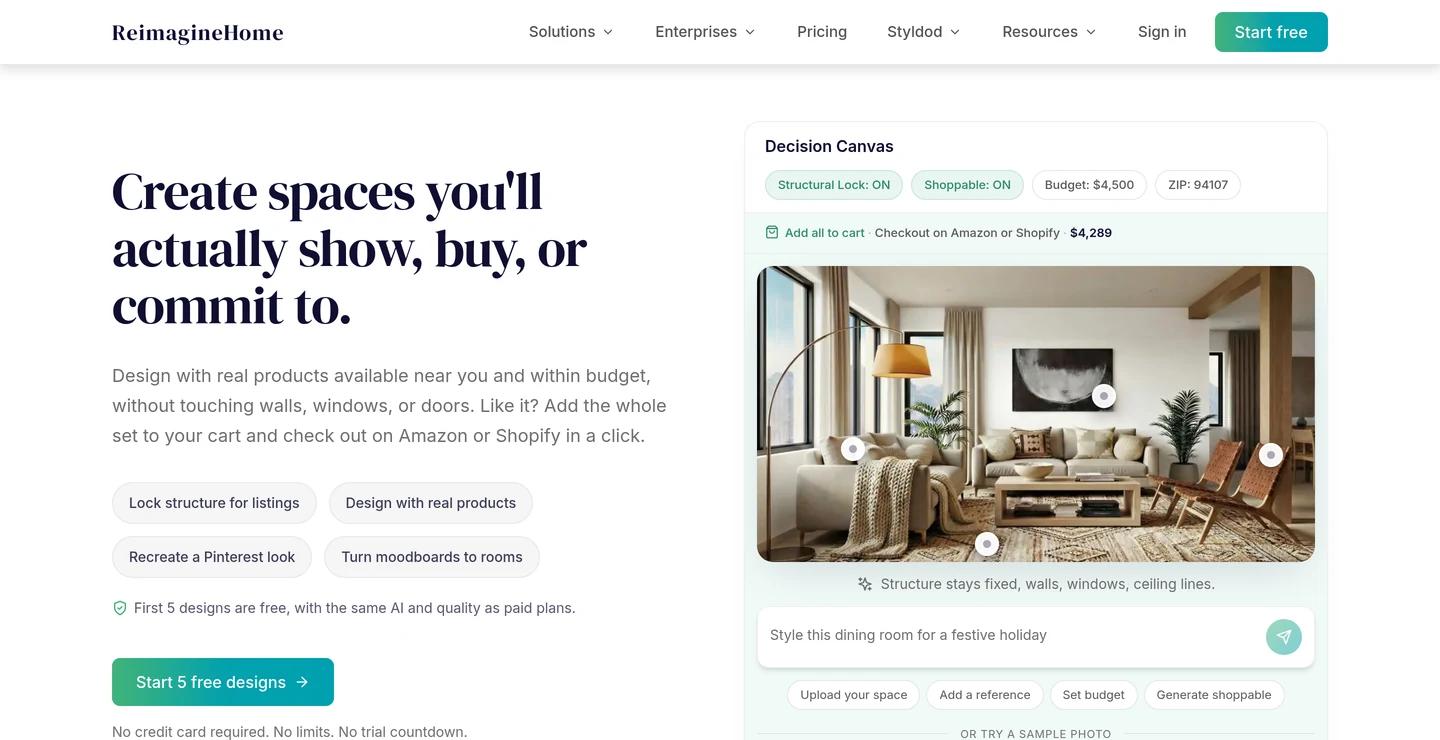
Essential staging and the Pro design workflow
REimagineHome Essential covers basic staging and light edits. Pro adds a conversational design workflow for interiors and exteriors, including more precise instructions and refinements. That makes the plan choice important: the entry subscription and the full design studio support different ways of working.
Briller begins with room analysis and the goal for your space. You can explore a design direction, keep the decisions you like and refine the next part. For a lived-in home, the useful brief may be to keep the layout and improve storage or lighting.
For occupied and empty listings
An agent furnishing an empty listing may find Essential sufficient. A furnished property that needs repeated instructions or reference-led edits calls for the Pro workflow. Briller is useful earlier in the sale preparation: decide which changes to make in the actual room, then discuss the finishes and labour behind them before commissioning the listing photographs.
Decide what to improve before listingReference-photo control and edit memory
REimagineHome Pro supports reference-photo control for scenes and objects, incremental conversational edits and memory across refinements. It suits a process where you explain the next change and develop the image over several turns.
A Briller moodboard can carry a specific solution from a reference: a ceiling detail, a storage element or a lighting arrangement. The point is to decide which part belongs in your room and then consider the material and fitting requirements that come with it.
For a first room project
When two people like different reference rooms, agree on the elements to borrow: the storage arrangement, pendant shape or wall treatment. REimagineHome Pro’s scene and object references support that visual conversation. Briller can take a particular reference detail into the brief and help explore its implications, such as a curtain pocket needing ceiling space and access for fitting.
Work through your first room refreshReal Products Discovery + Visualization
REimagineHome Pro includes Real Products Discovery + Visualization. It connects the redesign to shoppable items, with a higher credit cost when product discovery is part of the visualization. Essential does not include that workflow.
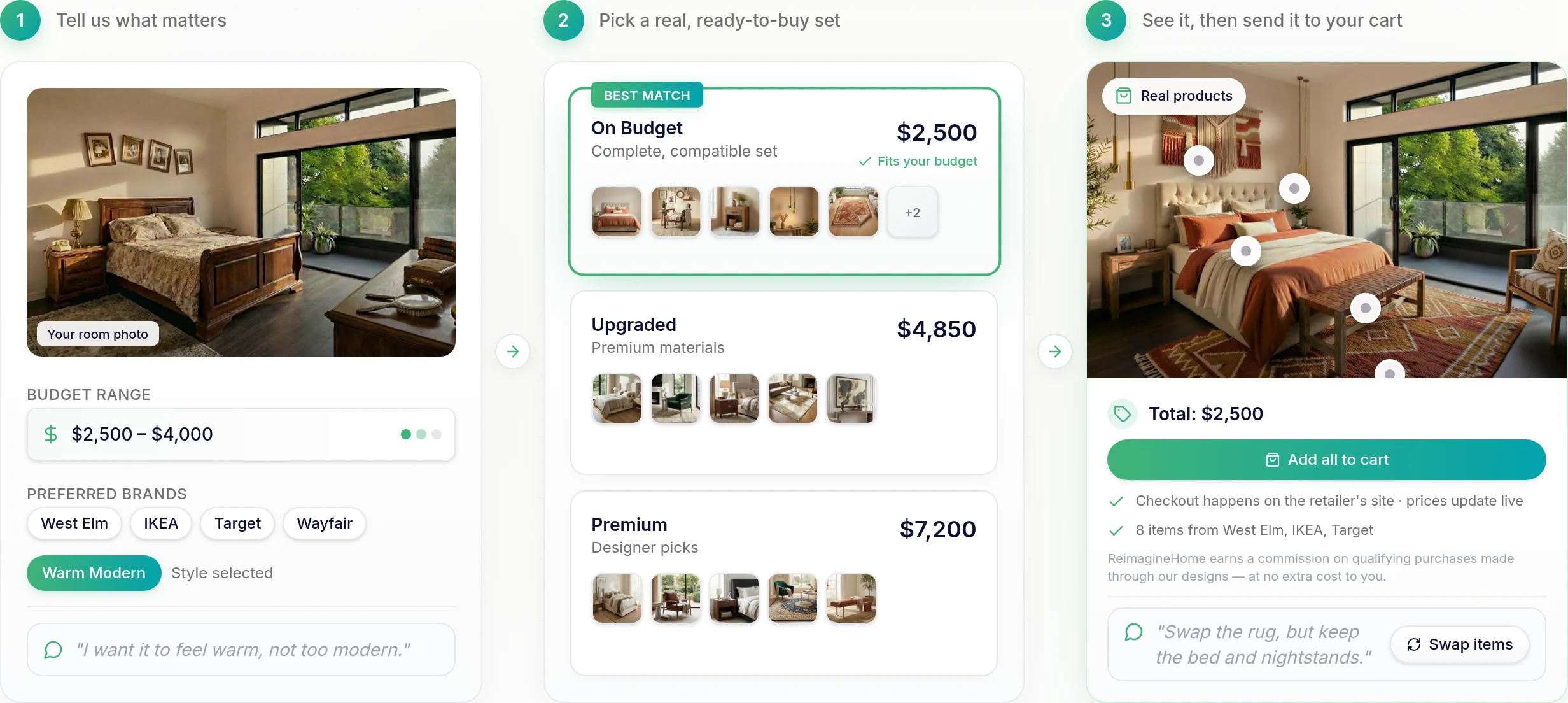
Real-product workflow: the room brief, a choice of furniture sets and the proposed room with shopping controls.
Briller’s Shop the Look supports an item shortlist. Alongside it, Briller’s budget options help you discuss specifications: the finish on a cabinet, the type of LED profile or the curtain-track detail. These choices help turn a shopping direction into a more useful project brief.
For investors buying to a budget
A flipper comparing several properties needs to distinguish a shoppable item from a complete installed cost. REimagineHome’s product-discovery visualization uses two credits rather than one for visualization alone. Briller’s budget-specific advice adds a discussion of preparation, supports and fitting choices. Check dimensions, local availability and the contractor’s quote before treating either shortlist as a purchasing schedule.
Compare renovation choices for an investmentListing batches and agency work
REimagineHome lists batch processing for property listings and team / agency workflow tools on Pro. Advanced and Agency increase the volume available through the Pro workflow. Watermark-free, high-resolution visuals support property and client presentations.
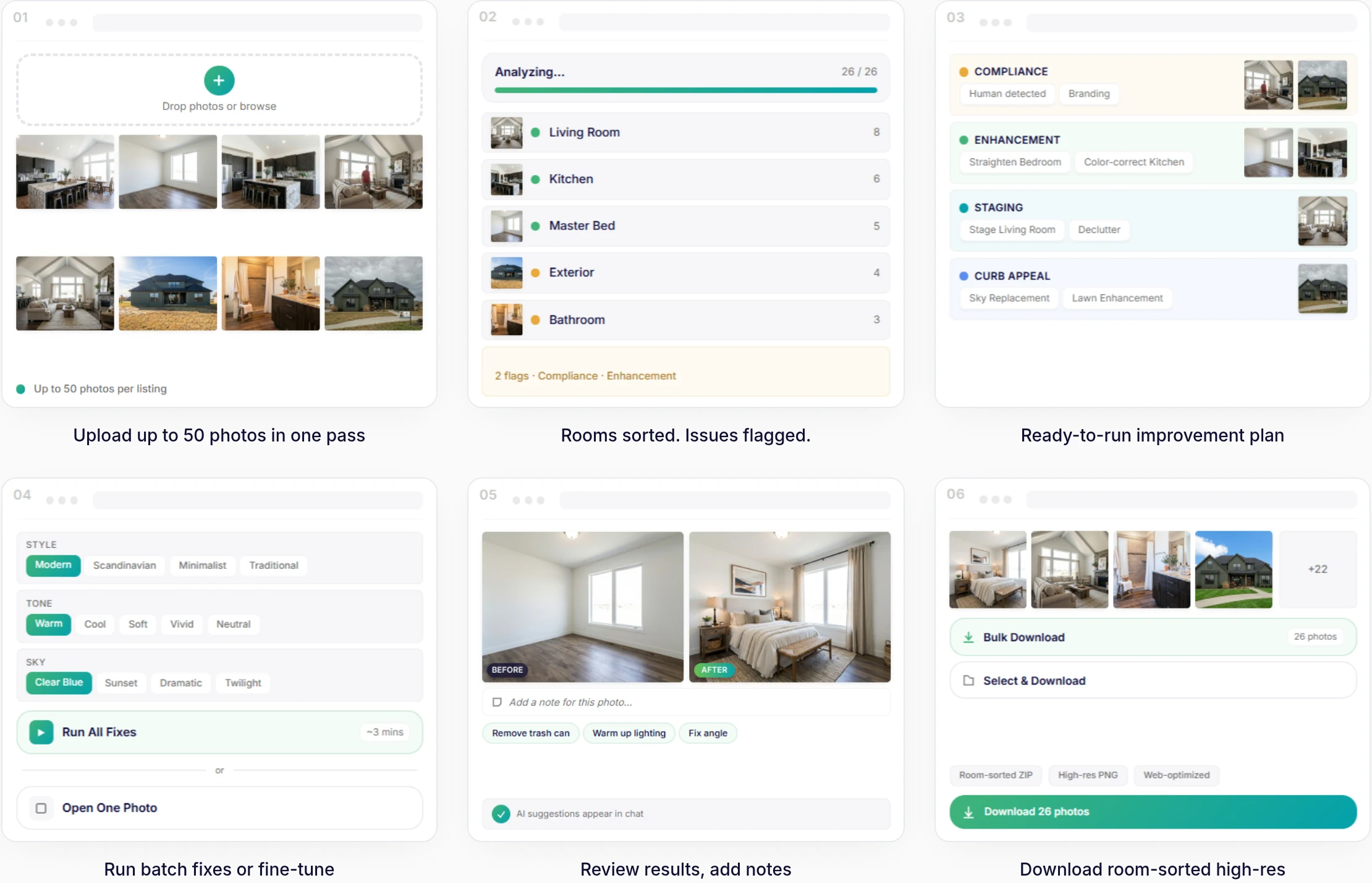
Listing batch demo: upload a set of property photos, review the suggested changes and export the finished gallery.
Briller Pro Design and Studio / Architect include PDF specifications and HD / 4K output. Studio / Architect adds shared projects. This can help a designer or homeowner keep the visual direction and the implementation discussion together through the handover.
For a developer’s sales and delivery teams
Batch processing helps a sales team prepare many property images; a construction team needs the selected finish explained consistently across units. REimagineHome’s higher tiers increase the credit pool for the Pro workflow. Briller Studio’s shared projects and PDF specifications can support the material discussion. Confirm REimagineHome’s team-seat count and batch controls against the number of people and listings involved.
Coordinate the finish proposal across unitsPros
- Reference-photo control and conversational refinements on Pro.
- Product discovery connects a visual direction with shopping.
- Batch tools fit listing-photo work.
Cons
- Essential does not include Pro’s reference, conversational and real-product workflow.
- Product discovery doubles the credit cost of a visualization.
Best for
Agents preparing listings and homeowners who want to refine a room around references and furniture they may actually buy.
Monthly subscriptions
Essential covers basic staging. Pro adds conversational control, references and real products; Advanced and Agency buy more credits for that workflow.
Monthly billing only. Each row pairs plans for a similar job; credits are each provider’s own units, not equal numbers of renders.
REimagineHome5 free designs; no card required.
Briller72-hour Pro trial with 15 credits at registration; Free also available.
| For this kind of work | REimagineHome | Briller |
|---|---|---|
| Basic staging | Essential$19 per month, billed monthly 30 credits / month | Explorer$9.99 per month, billed monthly 60 credits / month; 3 projects; 1 seat. Basic Briller insights. |
| Controlled redesign | Pro$36 per month, billed monthly 200 credits / month | Pro Design$24.99 per month, billed monthly 200 credits / month; unlimited projects; 1 seat. Full material specifications and installation advice across budgets. |
| More design volume | Advanced$59 per month, billed monthly 400 credits / month | Pro Design$24.99 per month, billed monthly 200 credits / month; unlimited projects; 1 seat. Full material specifications and installation advice across budgets. |
| Agency workload | Agency$119 per month, billed monthly 900 credits / month | Studio / Architect$69.99 per month, billed monthly 650 credits / month; unlimited projects; 3 seats. Full material specifications and installation advice across budgets. |
Visualization uses 1 credit; visualization with real-product discovery uses 2. Conversation and idea exploration use 0.
Prices checked:
Briller plans Official website